
We launched LangSmith Fleet last week as a way to build, use, and manage agents. A key part of this launch was the introduction of two different types of agent authorization.
Agent authorization refers to what the agent is authorized to do. When an agent calls a Slack tool - who does it authenticate as before pulling the data?
On-behalf-of
The standard way that most people thought of agents until recently is that they operate “on-behalf-of” a user.
Let’s imagine an onboarding agent with access to Notion and Rippling. When Alice interacts with it, it should be able to look up information about Alice in Rippling and see all pages in Notion that Alice has access to. Alice should not be able to use this onboarding agent to look up any private information about Bob in Rippling, or see any private Notion pages Bob might have. When Bob uses the onboarding agent, he should be able to access all his information in Rippling and all his private pages in Notion, but not Alice’s.
In order to implement this, you need a few things. You need a way to know who is using the agent - is it Alice or is it Bob? You then need to map those user IDs to some auth credentials that are passed into tools at runtime.
Then came OpenClaw
On-behalf-of was the primary way that people thought of agents until OpenClaw came around. With OpenClaw, Alice would create an agent. Maybe she would be the only one to use that agent (in which case this auth distinction would not matter much). But maybe she would expose to others, through different channels (like text or email or Twitter).
When others interacted with that agent, it didn’t use the credentials of the end user - it used the authorization that Alice had given it.
Sometimes this could be Alice’s own credentials, but that might not be that desirable. If the agent had Alice’s credentials, it could look up anything in Notion that Alice had access to. That might include private documents that he may not want others to be able to ask the agent about.
This lead to people creating dedicated accounts in Notion, Rippling, etc specifically for that agent, so they could control what that agent had access to. Everyone interacting with that agent would then effectively be using the same set of credentials.
LangSmith Fleet
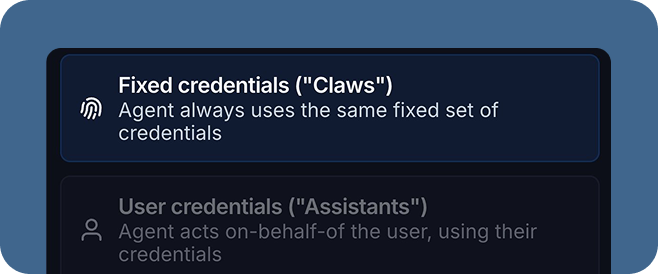
When launching LangSmith Fleet, we saw that people wanted both types of agents. Sometimes they wanted to create an agent and let others use it with their own credentials, other times they would want that agent to have its own fixed set of credentials. We added two different types of agents, which mapped to these two types of authorization:
- Assistants: act “on-behalf-of” their end user
- Claws: have their own fixed credentials
We also added the concept of channels (Slack, Gmail, Outlook, and Teams to start) and sharing of agents. Assistants and Claws support different channels. In order for Assistants to be shared, we have to have a mapping of an end user in that channel (e.g. their Slack user ID) to their LangSmith ID. So right now Assistants are only available in a subset of channels where we support that mapping.
Channels and these different authorization types also highlight the need for human in the loop. If you are creating an agent with a fixed set of credentials, and exposing it via a channel. You are opening it up to be used in a variety of ways. If that agent can take actions that may potentially be dangerous or sensitive, you might want to use some “human-in-the-loop” guardrails to ensure that those actions are gated.
Examples
To make this concrete, let’s take a look at a few of the real agents we’ve created and their authorization types.
Onboarding Agent: Assistant. Has access to Slack and Notion, and is exposed in Slack. Uses the end user’s Slack and Notion credentials.
Email Agent: Claw. This agent responds to incoming emails. Regardless of who is emailing, this agent will look at my calendar to determine meeting availability and attempt to respond on my behalf. Sending emails and calendar invites is gated behind a human-in-the-loop guardrail.
Product agent: Claw. This agent monitors competitors and help with product questions and roadmap. It has it’s own Notion account and is exposed via a custom Slack bot.
Future work
We’re excited to rollout these two different agent types in LangSmith Fleet. We think this is just the start, however, of agent authorization. Read this blog from WorkOS on some potential future directions.
We’re also excited to follow up this work with more granular memory permissions. Depending on which agent type (Assistants or Claws) you may want memory to be handled differently. For example, you probably don’t want an assistant remembering sensitive things about Alice that it can use in a chat with Bob. Right now, we manage this with access permissions. When you share an agent, you choose whether other users can edit it, including its memory. In the future, we will introduce user specific memory.