
Today we’re launching LangSmith Fleet - an enterprise workspace for creating, using, and managing your fleet of agents. These agents have their own memory, have access to a collection of tools and skills, and can be exposed through the communication channels your team uses every day.
A key part of LangSmith Fleet (formerly LangSmith Agent Builder) is its agent identity and agent sharing model. A credentials model controls who your agent acts on behalf of. A permissions model gives you control over who can use, edit, and share each agent in your workspace.
From building agents to managing your agent fleet
Just six months ago, building an agent required an engineer. Today, anyone on your team can describe a task in a short prompt and generate an agent to handle that job for you. That's how fast things have evolved.
We launched Agent Builder in October to enable knowledge workers to create their own agents with natural language. Since then, we’ve seen a consistent pattern: teams start with one or two agents for simple tasks like research or status checks. Then use cases expand and they start running more tasks across more agents. This allows people to offload many repetitive tasks that eat up the day so they can focus on the aspects of their job that require human judgment.
When agents are this easy to create, the hard part shifts to managing them: who owns which agents, how they authenticate across tools, who can audit what they do, and how to share a good one across the organization securely.
That's what LangSmith Fleet is for.
- Creating agents with a simple prompt
- Sharing so centralized teams can publish agents and team members can share
- Permissions so you control who can edit, run, or clone each agent
- Agent identity and credentials so you define how agents authenticate with company tools
- Inbox so users can track agent activity and approve actions with human-in-the-loop
- Observability to provide an auditable record of what every agent did and why
Tiered permissions and sharing
A good agent is valuable to the whole team. A vendor intake agent can serve your ops org. A weekly report agent can save every account manager thirty minutes on Monday morning. But sharing an agent across the enterprise requires control over who can modify it, who can use it, and who gets their own copy to customize. You can now configure all of this for each agent you create with Fleet.
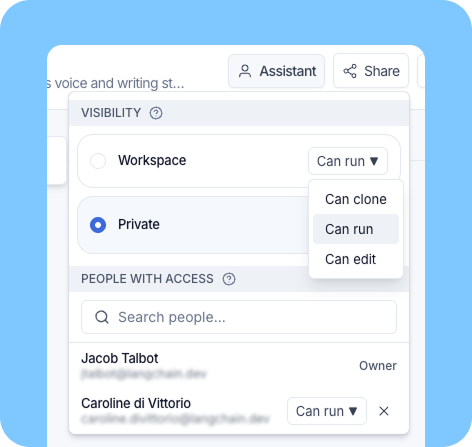
Agent sharing has two dimensions: who gets access, and what they can do.
Who: Share with individual users or with your entire workspace.
What: Three permission levels:
- Can clone: Clone the agent into their own version to customize
- Can run: Use the agent without modifying its configuration
- Can edit: Full access to change instructions, tools, and settings
You can layer these as needed. Give your core team edit access and share run-only with the broader workspace. Change or revoke permissions at any time.
Agent identity and credentials
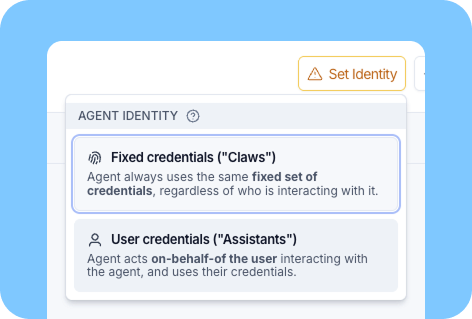
When multiple people run the same agent, it needs a secure way to authenticate with external tools. Sometimes each user should authenticate individually. Sometimes a shared service account makes more sense. You now have both options, configurable per agent.
"Claws" have a fixed set of credentials regardless of who runs them. Users don't need to log in for each tool. This has been the default in Fleet, and it's useful for something like a Linear Slack bot, where your entire team searches and creates issues using the same credentials.
"Assistant" agents act on behalf of the user who invokes them. Each user authenticates with their own account for each connected tool that requires credentials, using OAuth in Fleet. The agent acts within that user's permissions. This makes sense for something like a team knowledge base in Notion, where each user has different document access.
Agent identity for Slack bots
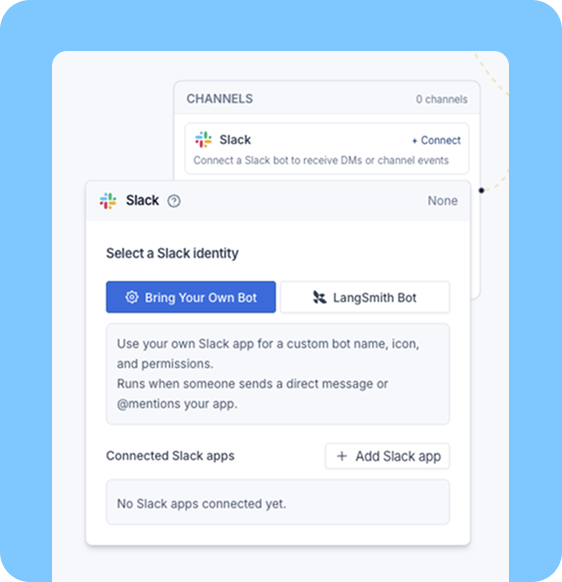
Fleet agents can already respond to messages in Slack. With agent identity, each agent can now have its own Slack bot.
Instead of routing everything through a single Slack bot, each agent can now be triggered with its defined name. Create a bot for each job and give it a Slack handle: @vendor-intake, @weekly-sales-numbers, @onboarding-agent. Your team can @mention an agent in a channel or DM it directly to hand off tasks without switching context.
Agent identity ties into permissions and credentials. A "Claw" with its own Slack bot works as a team resource. An "Assistant" agent is available only to users who authenticate with the agent's tools.
We’re expanding these same principles of agent identity to additional channels in the coming weeks.
Agent Inbox
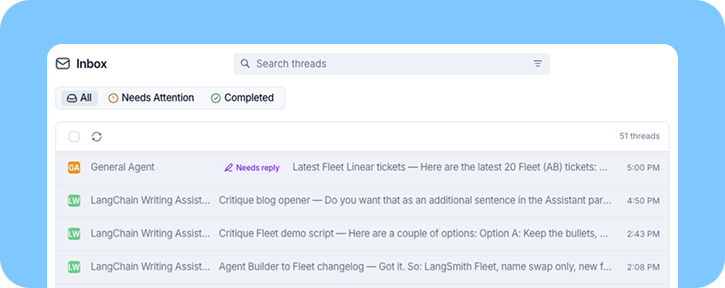
When you have multiple agents running tasks in parallel across your org, you need one place to review what's happening and act on it. The Inbox gives you human-in-the-loop oversight across all of your agents: review, approve, or reject actions for all of your agents from one central place without switching across tabs. This works for both "Assistants" and "Claws," based on specific permissions.
With "Claws," only users with edit access can review agent actions in the Inbox. They can view and respond to each thread. This is useful for an IT admin who needs to track agent activity, or a team lead who wants to review the issues an agent created and approve actions before they go out.
With "Assistants," each user's actions stay private to that user’s Inbox. That's what you want for an agent that handles sensitive personal tasks like reading private documents in Notion.
Agent observability
LangSmith already provides native tracing for every agent action in Fleet. Every tool call, every decision, every output is captured in a structured trace that you can inspect, search, and export.
For enterprises, this is the audit trail. You can see exactly what an agent did, why it made each decision, and what data it accessed. This works across both agents you build in code and agents created with Fleet.
When combined with agent identity and permissions, tracing gives you a complete picture: which agent acted, on whose behalf, with what credentials, and what it did at each step.
From one agent to an enterprise fleet
Most teams follow the same path: one person builds a good agent. A colleague tries it. Then the team begins running agents across their daily work. Fleet is built for that progression, giving you the control to share agents across your organization and visibility into their actions.
We're actively expanding Fleet, with more coming soon for agent sharing, identity, and safe, autonomous work in the weeks ahead.