
TL;DR
- In traditional software, you read the code to understand what the app does - the decision logic lives in your codebase
- In AI agents, the code is just scaffolding - the actual decision-making happens in the model at runtime
- Because of this, the source of truth for what your app does shifts from code to traces - traces document what your agent actually did and why
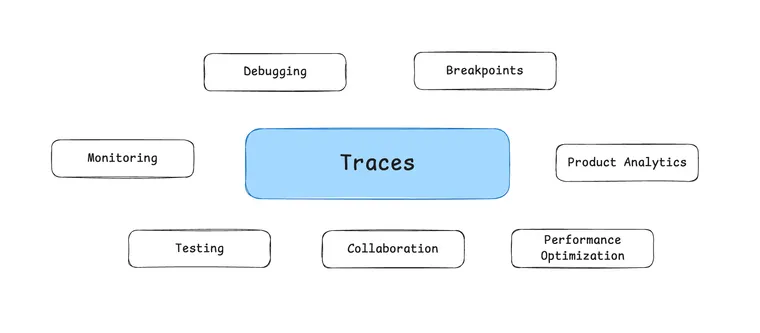
- This changes how we debug, test, optimize, monitor, collaborate, and understand product usage
- If you're building agents without good observability, you're missing the source of truth for what your system actually does
In traditional software, when something goes wrong, you read the code. When you want to understand how a feature works, you read the code. When you want to improve performance, you profile the code. The code is the source of truth.
In AI agents, this doesn't work anymore.
Why Code Doesn't Document Agent Behavior
In traditional software, if you want to understand what happens when a user submits a form, you open handleSubmit() and read the function. The decision logic is right there: validate inputs, check authentication, call the API, handle errors. It's deterministic - same input, same code path, same output.
In AI agents, code is just scaffolding.
Here's a simplified version of what agent code actually looks like:
agent = Agent(
    model="gpt-4",
    tools=[search_tool, analysis_tool, visualization_tool],
    system_prompt="You are a helpful data analyst..."
)
result = agent.run(user_query)
You've defined the pieces: which model, which tools, what instructions. But the decision logic isn't in your code. It just orchestrates LLM calls.
The actual decisions - which tool to call when, how to reason through the problem, when to stop, what to prioritize - all of that happens in the model at runtime.
You can still debug your orchestration code - whether tool calling works, whether parsing works. But you can't debug the intelligence. Whether the agent makes good decisions, whether it reasons effectively - that logic lives in the model, not in your codebase.
Traces as the New Documentation
So where does the actual behavior live? In the traces.
A trace is the sequence of steps an agent takes. It documents the logic of your app - the reasoning at each step, which tools were called and why, the outcomes and timing.
Debugging, testing, profiling, monitoring - all of these shift from operating on code to operating on traces.
In traditional software, if two runs produce different outputs, you assume different inputs or different code. In AI agents, the same input with the same code can produce different outputs. Different tool calls, different reasoning chains, different outcomes.
The only way to understand what happened is to look at the trace. Why did Task A succeed but Task B fail? Compare the traces. Did your prompt change improve reasoning? Compare traces before and after. Why does the agent keep making the same mistake? Look at the pattern across traces.
How This Changes Building Agents
When the source of truth for logic moves from code to traces, everything else follows. All the operations you used to do on code - debugging, testing, optimizing, monitoring - now need to center around traces. Let's look at what this means in practice.
Debugging Becomes Trace Analysis
When a user reports "the agent failed," you don't open the code and look for a bug. You open the trace and look for where the reasoning went wrong. Did the agent misunderstand the task? Call the wrong tool? Get stuck in a loop?
The "bug" isn't a logic error in your code. It's a reasoning error in what the agent actually did.
Example: An agent keeps retrying the same failed API call five times before giving up. Your code has retry logic - that works fine. The bug is that the agent isn't learning from the error message. You only see this in the trace: same tool call, same parameters, same failure, repeated.
You Can't Set a Breakpoint in Reasoning
In traditional software, when you find a bug, you set a breakpoint in the code.
In AI agents, you can't set a breakpoint in reasoning. The decision happens inside the model.
But you can set a breakpoint in logic using traces + playgrounds. Open a trace at a particular point in time - right before the agent made the bad decision. Load that exact state into a playground. The playground is like a debugger, but for reasoning instead of code.
You can see: What context did the agent have? What was in its memory? What tools were available? What did the prompt look like? Then you iterate - adjust the prompt, change the context, try different approaches - and see if the agent makes a better decision.
Testing Becomes Eval-Driven
Now that the source of truth for logic is in traces, you need to test those traces. This means two things:
First: you need a pipeline to add traces to your test dataset. As your agent runs, you capture traces and add them to a dataset that you can eval against.
Second: you need to eval traces in production. In traditional software, you test before deployment and ship. In AI, agents are non-deterministic, so you need to continuously eval in production to catch quality degradation and drift.
Performance Optimization Changes
In traditional software, you profile the code to find hot loops and optimize algorithms. In AI agents, you profile traces to find decision patterns - unnecessary tool calls, redundant reasoning, inefficient paths. The bottleneck is in the agent's decisions, and those only exist in traces.
Monitoring Shifts from Uptime to Quality
An agent can be "up" with 0 errors and still be performing terribly - succeeding at the wrong task, succeeding inefficiently at 10x the cost, or giving correct but unhelpful answers.
You need to monitor quality of decisions, not just system health - task success rate, reasoning quality, tool usage efficiency. You can't monitor quality without sampling and analyzing traces.
Collaboration Moves to Observability Platforms
In traditional software, collaboration happens in GitHub. You review code, leave comments on PRs, discuss implementation in issues. The code is the artifact everyone works with.
In AI agents, the logic isn't in the code - it's in the traces. So collaboration has to happen where the traces are too. Sure, you still use GitHub for the orchestration code. But when you're debugging why the agent made a bad decision, you need to share a trace, add comments on specific decision points, discuss why it chose this path. Your observability platform becomes a collaboration tool, not just a monitoring tool.
Product Analytics Merges with Debugging
In traditional software, product analytics is separate from debugging. Mixpanel tells you what users clicked. Your error logs tell you what broke. They're different tools for different questions.
In AI agents, these merge. You can't understand user behavior without understanding agent behavior. When you see "30% of users are frustrated" in your analytics, you need to open traces to see what the agent did wrong. When you see "users asking for data analysis features", you need to look at traces to see which tools the agent is already choosing and what's working. The user experience is the agent's decisions, and those decisions are documented in traces - so product analytics has to be built on traces.
Make the shift
In traditional software, the code is your documentation. In AI agents, the trace is your documentation.
The shift is simple: when the decision logic moves from your codebase to the model, your source of truth moves from code to traces.
To make this work, you need good observability. Structured tracing that you can search, filter, and compare. The ability to see the full reasoning chain - which tools were called, how long things took, what it cost. The ability to run evals on historical data to monitor quality over time.
If you're building agents and you don't have this, you're working blind. The logic that matters only exists in those traces.