
By Robert Xu
Recently at LangChain we’ve been building skills to help coding agents like Codex, Claude Code, and Deep Agents CLI work with our ecosystem: namely, LangChain and LangSmith. This is not an effort unique to us - most (if not all) companies are exploring how to create skills to give to coding agents. A key part of building these skills is making sure they actually work. In this blog, we cover some learnings and best practices for how to evaluate skills as you create them.
What are Skills?
Skills are curated instructions, scripts, and resources that improve agent performance in specialized domains. Importantly, skills are dynamically loaded through progressive disclosure — the agent only retrieves a skill when it’s relevant to the task at hand. This helps agents scale their performance; historically, giving too many tools to an agent would cause its performance to degrade.
In practice, skills can be thought of as prompts that are dynamically loaded when the agent needs them. Like any prompt, they can impact agent behavior in unexpected ways. Consequently, skills need to be tested, just like you would your LLM prompts. Which skills improve coding agent performance? Which content changes resulted in the most improvement?
The Basic Evaluation Pipeline
Our basic approach for testing skills:
- Define tasks you want Claude Code to successfully complete
- Define skills that help with the tasks
- Run Claude Code on the tasks without skills
- Run Claude Code on the tasks with skills
- Compare performance and iterate on your skill
Below, we share some best practices from our experiences on creating your own evaluation pipeline.
Step 1: Set Up a Clean Testing Environment
Skills are commonly used with coding agents like Claude Code, or harnesses like Deep Agents. When you’re testing a skill, you’re really testing if these powerful agents can use the skill information effectively. You’re testing if the agent’s performance improves — so in practice, you’re testing the coding agent itself.
Coding agents and harnesses have a large action space they can operate over. They are also sensitive to starting conditions: Claude Code will often explore your directory before it starts working, and what it finds will shape its approach. This means when testing skills, it’s critical to prepare a consistent and clean environment for the agent using your skills. It ensures you maximize the reproducibility of your tests.
In our testing, we used a lightweight Docker scaffold to run Claude Code in. Other alternatives include Harbor or your choice of sandbox.
def run_claude_in_docker(
    test_dir: Path, prompt: str, timeout: int = 300, model: str = None
) -> subprocess.CompletedProcess:
    """Run Claude CLI in Docker. Returns CompletedProcess."""
    if not check_docker_available():
        raise RuntimeError("Docker not available")
    cmd = ["run-claude", str(test_dir), prompt, "--timeout", str(timeout)]
    if model:
        cmd.extend(["--model", model])
    try:
        return run_shell("docker.sh", *cmd, timeout=timeout + 30, check=False)
    except subprocess.TimeoutExpired:
        return subprocess.CompletedProcess(cmd, 124, "", f"Timeout after {timeout}s")
Step 2: Define the Tasks
While it’s tempting to rely on vibes to feel whether your coding agent improves with skills, performance can and will vary over different tasks. Clearly defined tasks provide a systematic benchmark to catch regressions. Lessons we learned from building tasks include:
Create Constrained Tasks
- Open-ended output is difficult to grade, especially with coding agents. If we asked Claude Code to create a LangChain agent to do research, it could take a variety of approaches. Grading the quality of the agent Claude Code produced is difficult, and being too prescriptive on the agent design penalizes working solutions that produce valid research.
- One strategy we found helpful was to have Claude Code fix buggy code. This constrained its design space, and made it easier to validate correctness: if the resulting agent still produced buggy behavior on predefined tests, we could safely fail Claude’s solution. Additionally, design checks were less brittle, as Claude was primed to use our existing approach.
Pair Tasks with Clear Metrics
- Clear metrics are critical to quantifying whether your skill improves the coding agent. Some metrics we tracked were:
- Was the skill invoked? And vice versa, was the skill not invoked when it wasn’t relevant?
- Did the agent accomplish the task? One task might involve several different steps, and tracking the number of completed steps helped separate ‘total failure’ from ‘almost worked’.
- How many turns did Claude Code take to complete the task? Even if Claude Code could complete the task without skills, including skills might improve efficiency.
- How long did Claude Code take in real time to complete the task? Not every turn is equal when it comes to measuring efficiency.
- We tracked these metrics, as well as how they change each run, with LangSmith evaluations. This gave us a single pane of glass for understanding experiment results.
Don’t Overindex on Difficulty
- When you evaluate a skill, you’re doing it through a coding agent or harness. Coding agents are already very good problem solvers. If you make your tasks too adversarial or convoluted, you risk testing the coding agent’s problem solving capability rather than your skill.
- It’s useful to base tasks on real failures you’ve observed in your coding agent. As a heuristic, you should aim to create the most straightforward test case that leads to the failure. For example, we noticed Claude Code struggled to effectively upload evaluators to LangSmith. Our test case asked Claude, “given this dataset, create a trajectory evaluator and upload it to LangSmith”.
Example Task
In our internal tests, we evaluated Claude on basic LangChain and LangSmith tasks. This is what an example task might look like:
// TASK
Create a trajectory dataset with 5 examples from the 5 most recent traces
in our LangSmith project, plus an evaluator measuring tool call match percentage.

Output: trajectory_dataset.json and trajectory_evaluator.py
(upload both as "bench-{run_id}" to LangSmith)

Run any code you write directly.
As part of this, we would expect it to create a trajectory_dataset.json. We can score the output with a metric like the below:
# SAMPLE METRIC, checks the dataset Claude generates
def check_accuracy(runner: TestRunner):
    """Trajectories match ground truth.""" # Did Claude's output match ground truth
    dataset_file = runner.artifacts[0] # Claude's output: trajectory_dataset.json
    test_dir = Path(".")
    p, f = check_trajectory_accuracy(
        test_dir=test_dir,
        outputs=runner.context,
        filename=dataset_file,
        expected_filename="expected_dataset.json", # Ground Truth, expected_dataset.json
        data_dir=test_dir / "data", # folder in task where we store ground truth
    )
    for msg in p:
        runner.passed(msg)
    for msg in f:
        runner.failed(msg)
To see all the tests we ended up writing, see our benchmarking repo here.
Step 3: Define the Skills
In creating and iterating on skills, the primary considerations are what content to include, and where to put that content. Skills often come with AGENTS.md or CLAUDE.md files that are always loaded into context. Some questions to answer are:
- Should content be in AGENTS.md (pre-loaded) or in a skill?
- Should content be in one large skill or split across multiple smaller skills?
- Can content be removed without impacting performance deltas?
Helpful guidelines we followed were:
Make Skills Modular
- We use XML tags to delineate different sections of a skill’s content. This not only adds structure for the agent, it provides a convenient way to substitute or remove sections to A/B test skills.
- We generally found that for larger skills (300-500 lines), small formatting or wording changes had limited impact. For example, positive (”do this”) vs. negative (”don’t do this”) guidance, and markdown vs. XML tags had similar performance on recorded tasks.
- When iterating, we generally make changes to one or more sections for testing, rather than optimizing at a more granular level.
Leverage AGENTS.md and CLAUDE.md
- In practice, skills are not always invoked reliably. On one task to create a LangChain agent, Claude Code never invoked the “langchain agents” skill. Even including a prompt to invoke skills only brought invocation rate up to 70%.
- Because AGENTS.md and CLAUDE.md are loaded into context reliably, it’s a good place to tell Claude how and when to use skills. This allowed us to achieve consistent skill invocation.
- AGENTS.md and CLAUDE.md are good places to include guidance on using multiple skills together. We saw more consistent pass rates with fewer turns taken in tasks using LangSmith skills.
Balance Content Across Skills
- Skill names and descriptions are critical for Claude Code to determine which skill to call. In tests where we ran with ~20 similar LangGraph skills, Claude Code would sometimes call the wrong skills. At 12 skills, Claude consistently called the correct skills.
- Consolidating skill content in a small number of skills means that content will make it into context more consistently — however, it also means Claude Code is loading in larger chunks at a time, and potentially sees content it doesn’t need. Finding the right balance takes testing!
Step 4: Run and Compare Performance
To test our skills, we ran Claude Code on our tasks, with different combinations of skills. Some test cases included:
- Control case where we ran Claude Code with no skills
- Running Claude Code with all skills on the task
- Running Claude Code with skills consolidated into a few large skills
- Running Claude Code with skills split across smaller skills
We compared the completion rate of tasks under each scenario using LangSmith’s pytest integration. Including the skills was almost always beneficial, and different splits of content performed better on different tasks. Overall, Claude Code with skills completed tasks 82% of the time, but performance dropped to 9% without skills. However, more than just comparing task completion rate, we needed to understand why Claude failed so we could iterate on the skill.
It was non-trivial to understand what Claude Code was doing within Docker, and why — we needed observability into Claude Code’s trajectory. In our tests, we integrated with LangSmith to capture every action Claude Code took. We could understand what files it read, which scripts it created, and which skills it did (or did not) invoke.
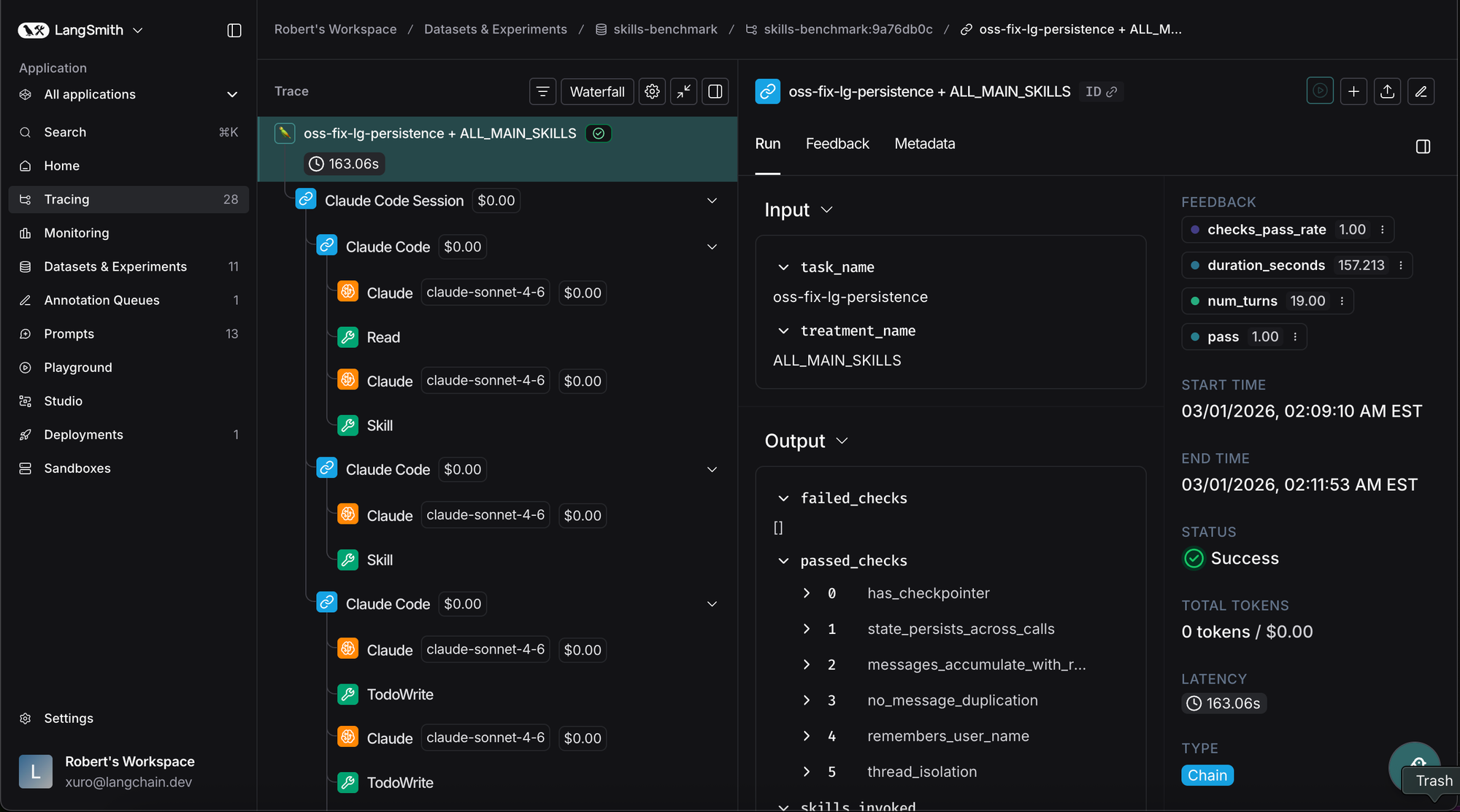
Critically, we had Claude Code use its own tracing skill to inspect the traces and summarize what happened. This made iterating on skill content much faster. Claude Code would send traces to LangSmith, pull down those traces, and summarize issues for a human to inspect. The human could then propose fixes, rerun tests, and see how performance changed in LangSmith’s experiment portal.
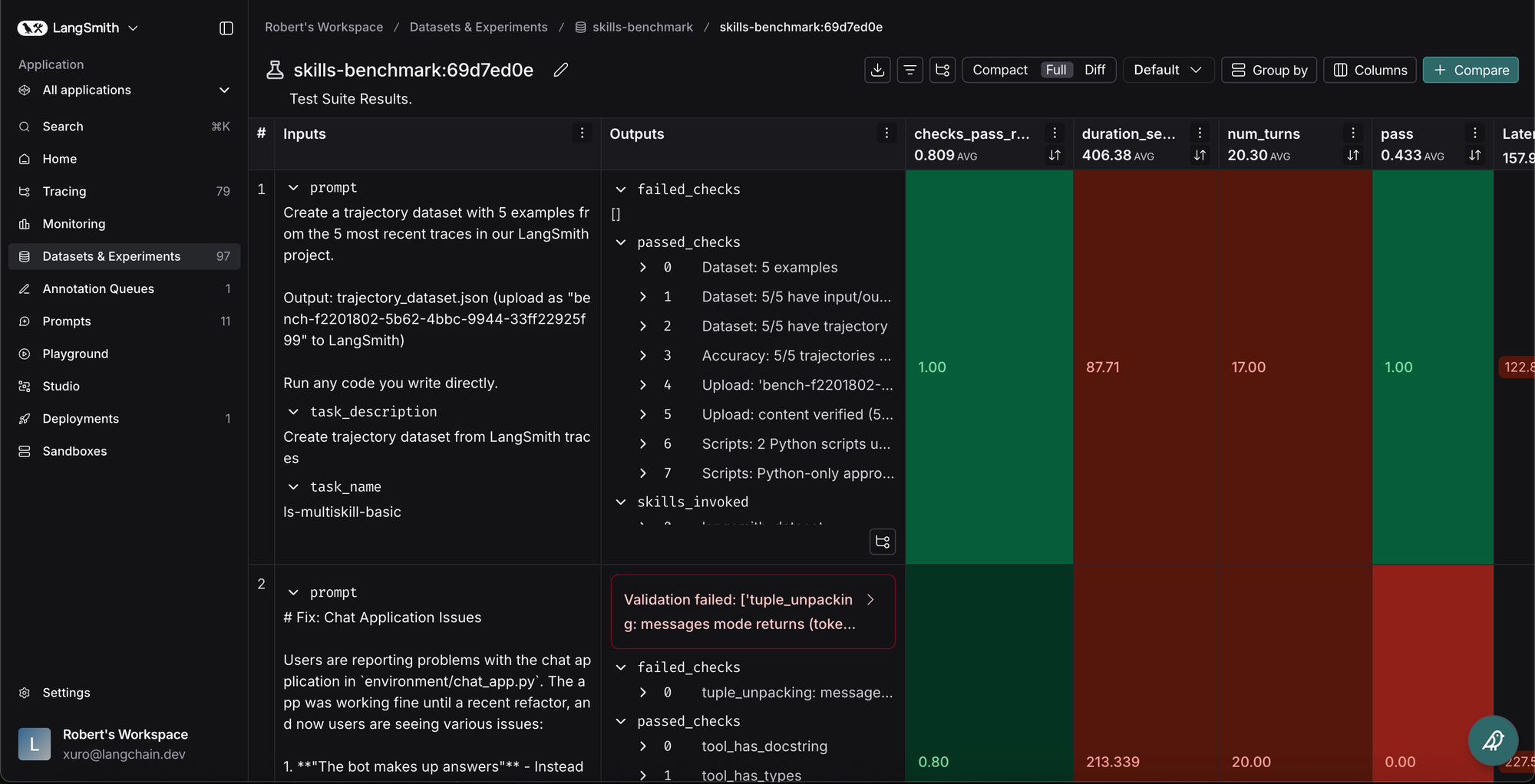
When setting up your own skill evaluation pipeline, having good observability and good evaluation is critical — particularly because agents like Claude Code are so powerful.
Conclusion
Skills are a useful way to enhance the capabilities of coding agents, including Claude Code, Codex, or Deep Agents CLI. Just like other components involving LLMs and agents, skills need to be evaluated to be useful.
To see all of this in action - see our benchmarking repo here.
We hope these learnings provide good evaluation heuristics when you build your own skills. For those of you getting started with evaluating skills, check out LangSmith’s evaluation platform!