

Over the past month at LangChain, we shipped four applications on top of the Deep Agents harness:
- DeepAgents CLI: a coding agent
- LangSmith Assist: an in-app agent to help with various things in LangSmith
- Personal Email Assistant: an email assistant that learns from interactions with each user
- Agent Builder: a no-code agent building platform powered by meta deep agents
Building and shipping these agents meant adding evals for each of them, and we learned a lot along the way! In this post, we’ll be diving deep into the following patterns for evaluating deep agents.
- Deep agents require bespoke test logic for each datapoint — each test case has its own success criteria.
- Running a deep agent for a single-step is great for validating decision-making in specific scenarios (and saves tokens too!)
- Full agent turns are great for testing assertions about the agent’s “end state”.
- Multiple agent turns simulate realistic user interactions but need to be kept on rails.
- Environment setup matters — Deep Agents need clean, reproducible test environments
Glossary
Before diving in, we’ll define a few terms we use throughout this post.
Ways to run an agent:
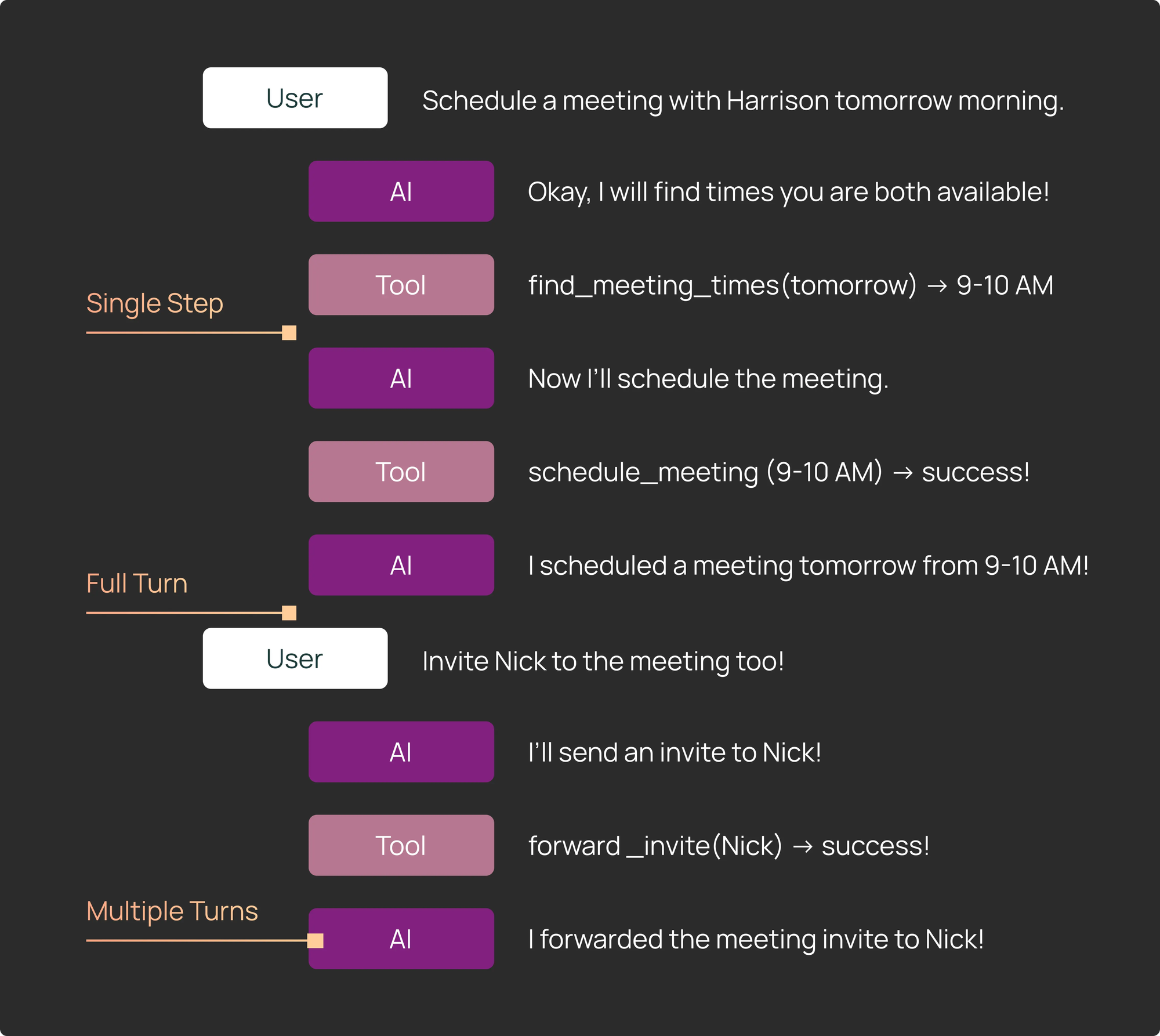
- Single step: Constrain the core agent loop to run for only one turn, determining the next action the agent will take.
- Full turn: Run the agent in its entirety on a single input, which can consist of multiple tool-calling iterations.
- Multiple turns: Run the agent multiple times in its entirety. Often used to simulate a “multi-turn” conversation between an agent and a user with several back-and-forth interactions.
Things we can test:
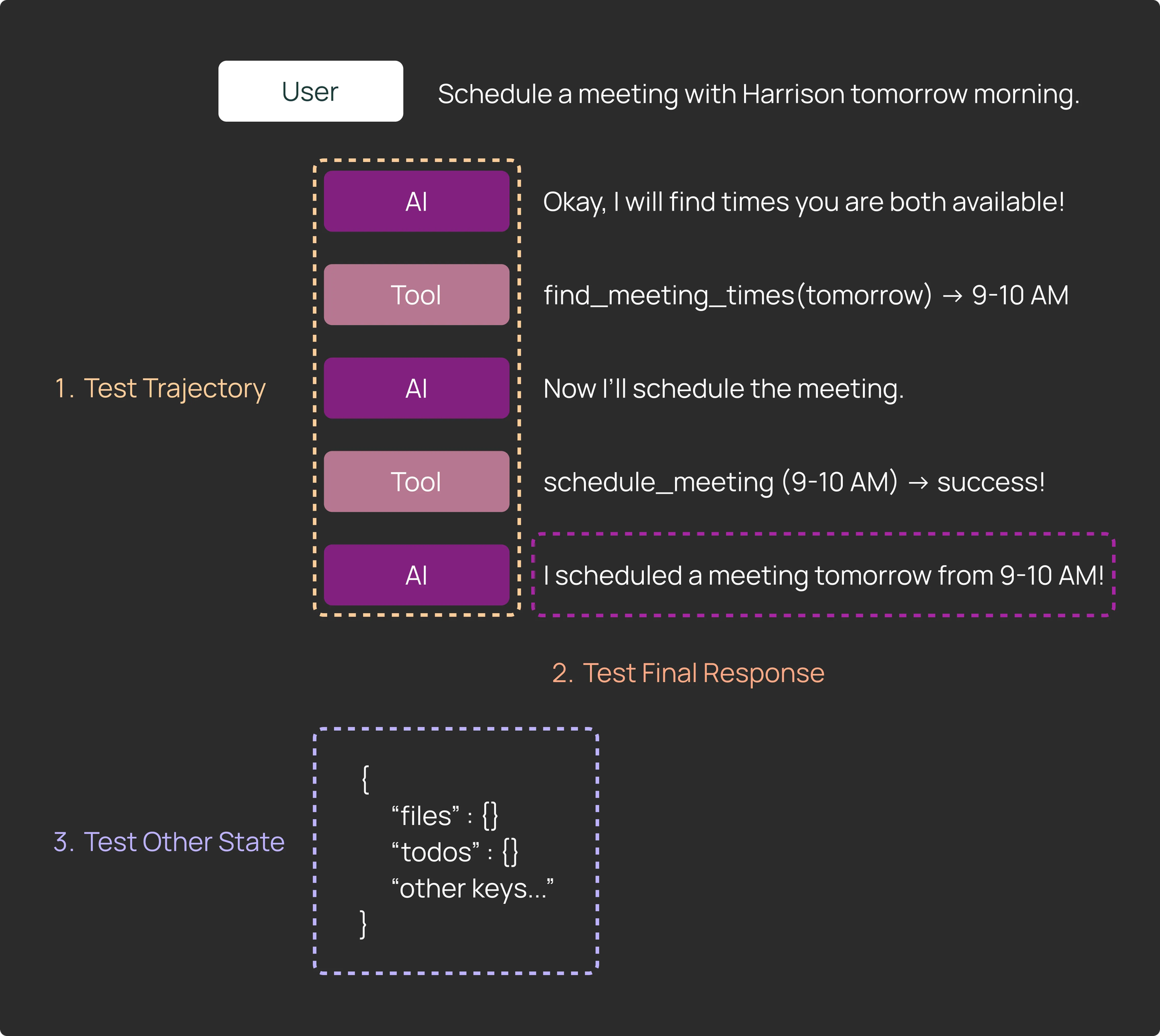
- Trajectory: The sequence of tools that are called by the agent, and the specific tool arguments the agent generates.
- Final response: The final returned response from the agent to the user.
- Other state: Other values that the agent generated while running (e.g. files, other artifacts)
#1: Deep Agents require more bespoke test logic (code) for each datapoint
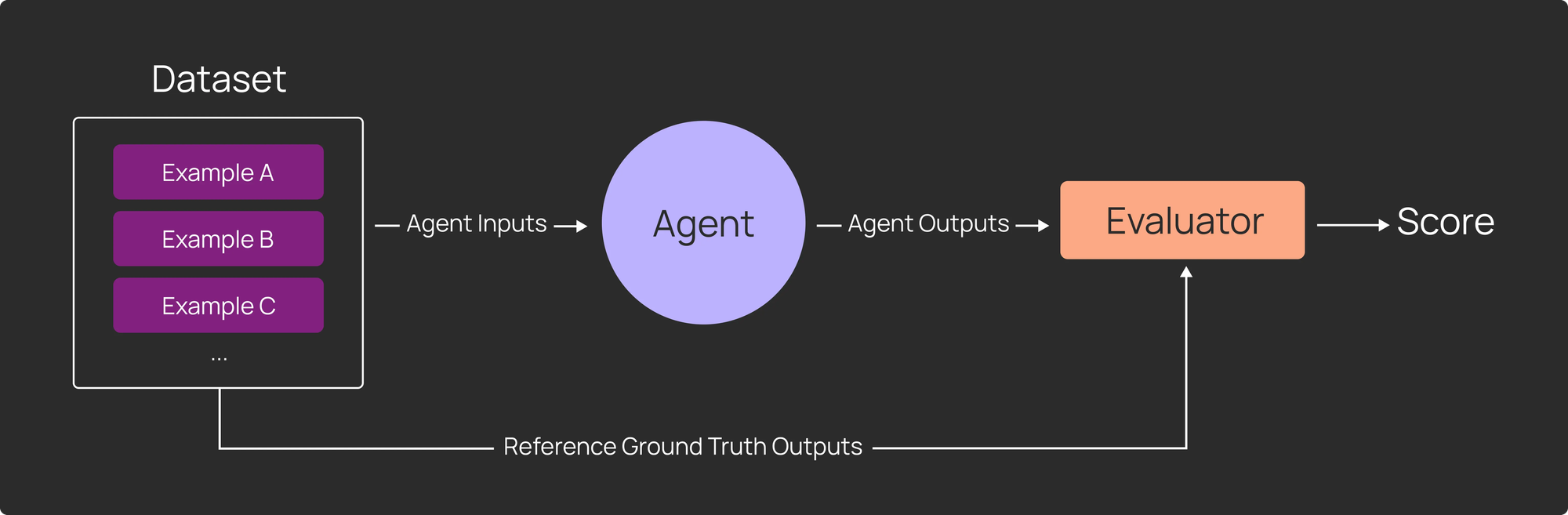
Traditional LLM evaluation is straightforward:
1) Build a dataset of examples
2) Write an evaluator
3) Run your application over the dataset to produce outputs, and score those outputs with your evaluator
Every data point is treated identically — run through the same application logic, scored by the same evaluator.
Deep Agents breaks this assumption. You’ll want to test more than just the final message. The “success criteria” may be also more specific to each datapoint, and may involve specific assertions against the agent’s trajectory and state.
Consider this example:
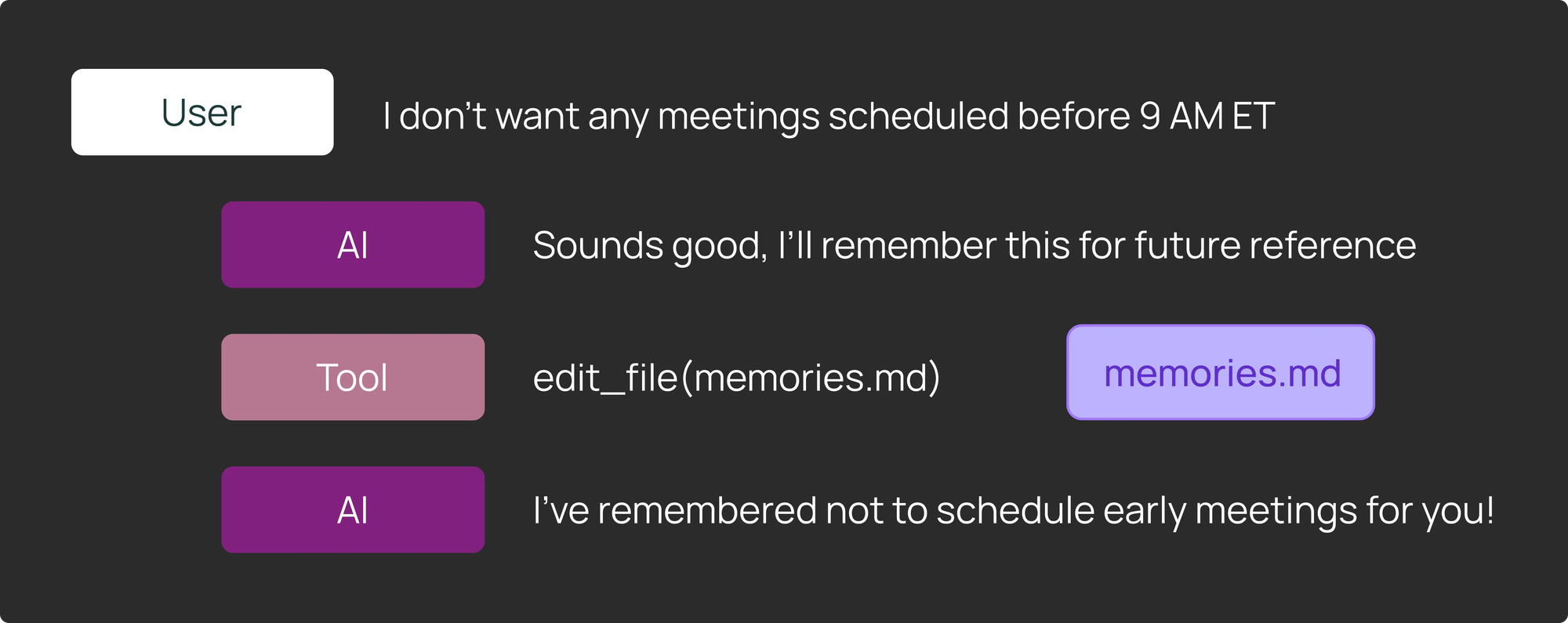
We have a calendar scheduling deep agent that has the ability to remember user preferences. A user asks their agent to "remember to never schedule meetings before 9am". We want to assert that the calendar scheduling agent updates its own memories in its filesystem to remember this information.
In order to test this, we might want to write assertions to verify that:
1) The agent called edit_file on the memories.md file path
2) The agent communicated the memory update to the user in its final message
3) The memories.md file actually contains information about not scheduling early meetings. You could:
- Use regex to look for a mention of “9am”
- Or use an LLM-as-judge with specific success criteria for a more holistic analysis of the file update
LangSmith’s Pytest and Vitest integrations support this type of bespoke testing. You can make different assertions about the agent’s trajectory, final message, and state for each test case.
# Mark as a LangSmith test case
@pytest.mark.langsmith
def test_remember_no_early_meetings() -> None:
    user_input = "I don't want any meetings scheduled before 9 AM ET"
    # We can log the input to the agent to LangSmith
    t.log_inputs({"question": user_input})

    response = run_agent(user_input)
    # We can log the output of the agent to LangSmith
    t.log_outputs({"outputs": response})

    agent_tool_calls = get_agent_tool_calls(response)

    # We assert that the agent called the edit_file tool to update its memories
    assert any([tc["name"] == "edit_file" and tc["args"]["path"] == "memories.md" for tc in agent_tool_calls])

		# We log feedback from an llm-as-judge that the final message confirmed the memory update
		communicated_to_user = llm_as_judge_A(response)
    t.log_feedback(key="communicated_to_user", score=communicated_to_user)

    # We log feedback from an llm-as-judge that the memories file now contains the right info
    memory_updated = llm_as_judge_B(response)
    t.log_feedback(key="memory_updated", score=memory_updated)
For a general code snippet of how to use Pytest, check out these docs:
This LangSmith integration automatically logs all test cases to an experiment, so you can view traces for a failed test case (to debug what went wrong) and track results over time.
#2: Single step evals are valuable and efficient
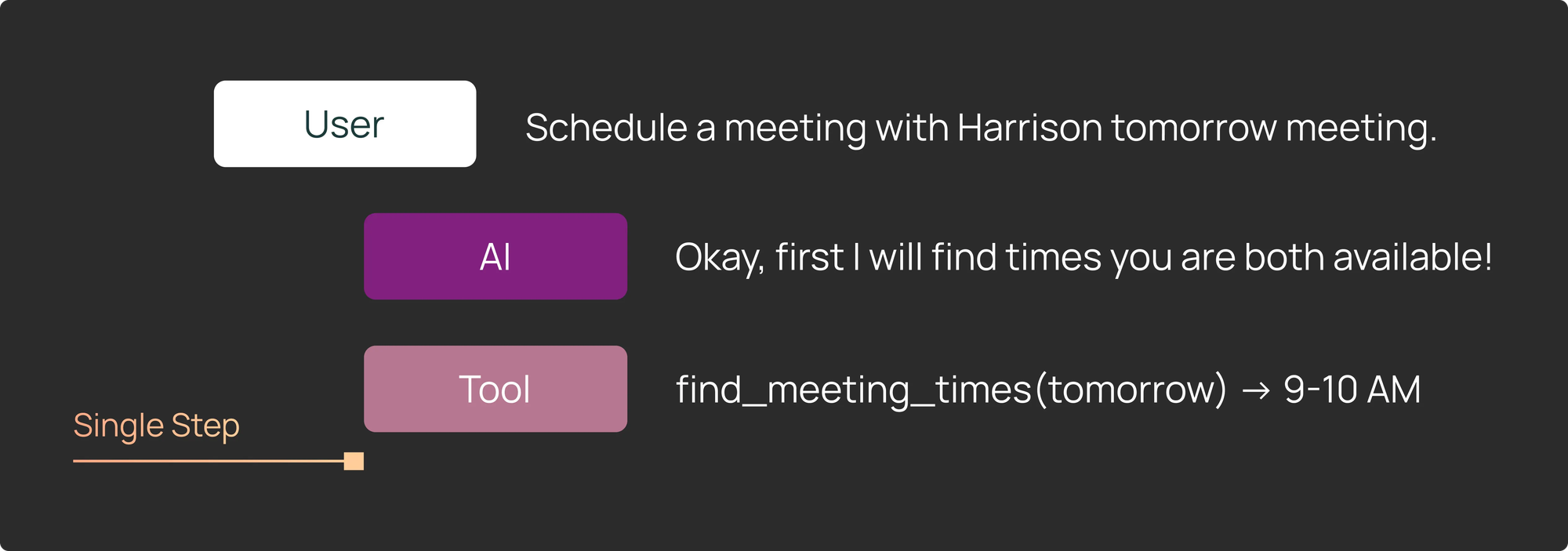
When running our evals for Deep Agents, about half of our test cases looked like single step evals, i.e. what did the LLM decide to do immediately after a specific series of input messages?
This is especially useful for validating that the agent called the correct tool with the correct arguments in a specific scenario. Common test cases include:
- Did it call the right tool to search for meeting times?
- Did it inspect the right directory contents?
- Did it update its memories?
Regressions often occur at individual decision points rather than across full execution sequences. If using LangGraph, its streaming capabilities allow you to interrupt the agent after a single tool call to inspect the output — so you can catch issues early without the overhead of a complete agent sequence.
In the code snippet below, we manually introduce a break point before the tools node, allowing us to easily run the agent for a single step. We can then inspect and make assertions about the state after that single step.
@pytest.mark.langsmith
def test_single_step() -> None:
	state_before_tool_execution = await agent.ainvoke(
	    inputs,
	    # interrupt_before specifies nodes to stop before
	    # interrupting before the tool node allows us to inspect the tool call args
	    interrupt_before=["tools"]
	)
	# We can see the message history of the agent, including the latest tool call
	print(state_before_tool_execution["messages"])
#3: Full agent turns give you a complete picture
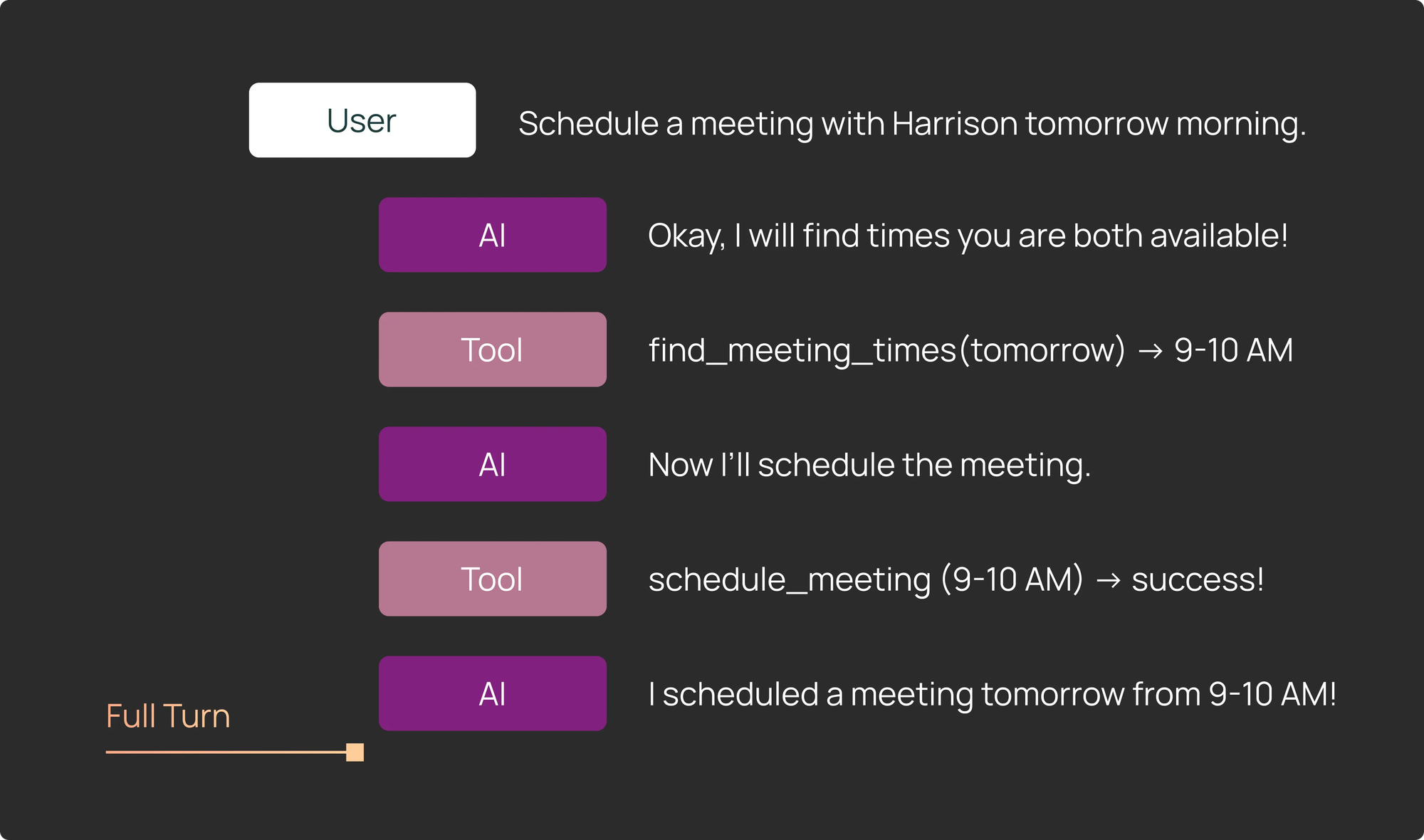
Think of single-step evals as your “unit tests” that ensure the agent takes the expected action in a specific scenario. Meanwhile, full agent turns are also valuable — they show you a complete picture of the end-to-end actions that your agent takes.
Full agent turns let you test agent behavior in multiple ways:
1) Trajectory: A very common way to evaluate a full trajectory is to ensure that a particular tool was called at some point during action, but it doesn’t matter exactly when. In our calendar scheduler example, the scheduler might need multiple tool calls to find a suitable time slot that works for all parties.
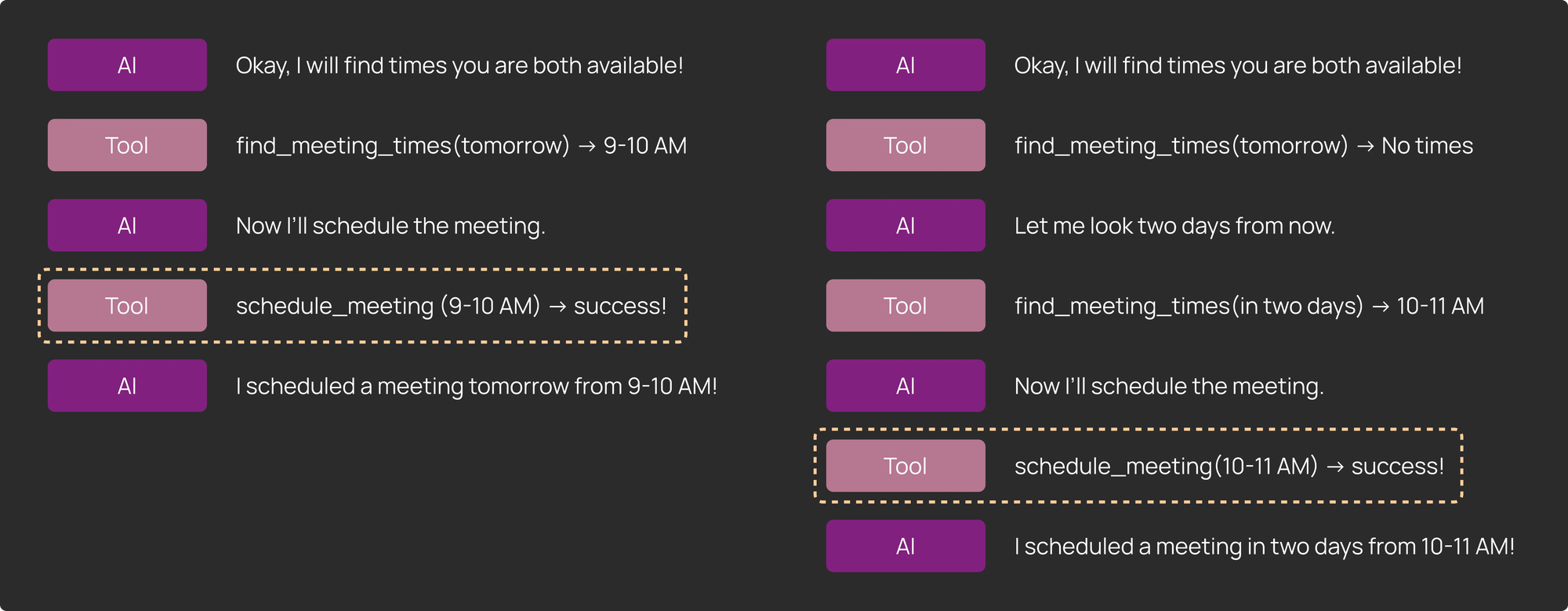
2) Final Response: In some cases, the quality of the final output matters more than the specific path taken by the agent. We found this to be true for more open-ended tasks like coding and research.
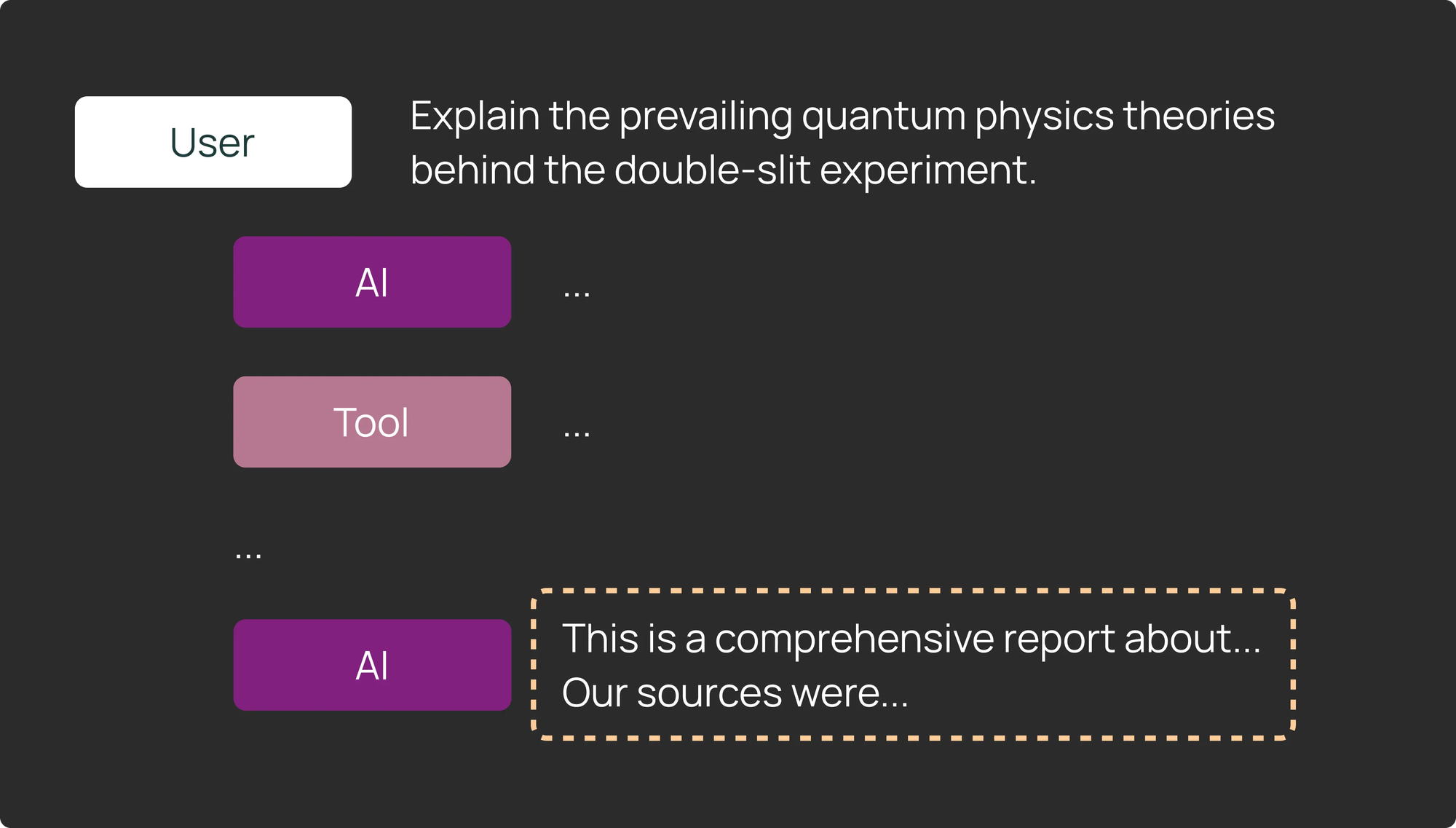
3) Other State: Evaluating other state is very similar to evaluating an agent’s final response. Some agents will create artifacts instead of responding to the user in a chat format. Examining and testing these artifacts is easy by examining an agent’s state in LangGraph.
- For a coding agent → read and then test the files that the agent wrote.
- For a research agent → assert the agent found the right links or sources.
Full agent turns give you a complete picture of your agent execution. LangSmith makes it really easy to view your full agent turns as traces, where you can see high level metrics like latency and token use, while also analyzing specific steps down to each model call or tool invocation.
#4: Running an agent across multiple turns simulates full user interactions
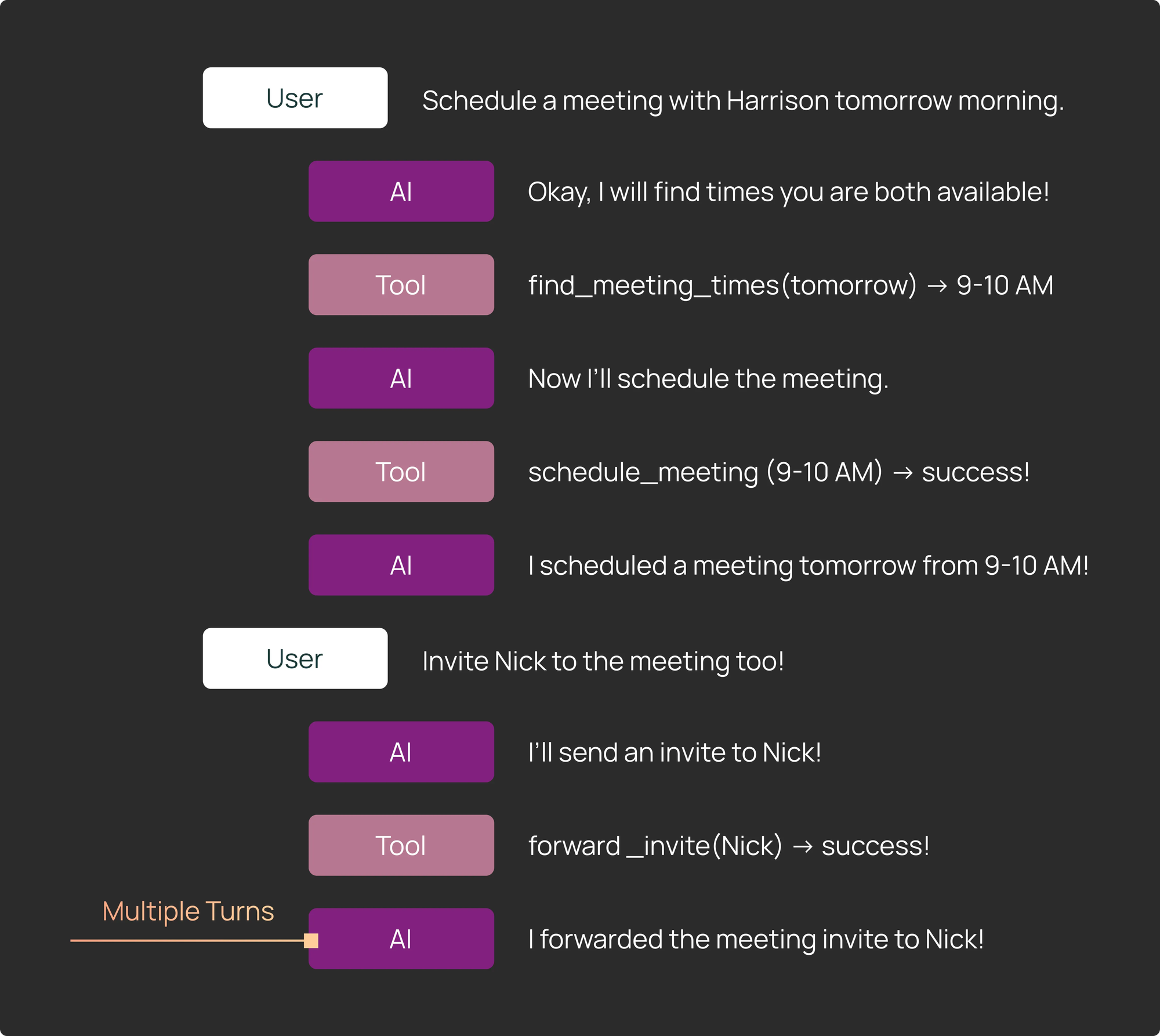
Some scenarios require testing agents across multi-turn conversations that have multiple sequential user inputs. The challenge is that if you naively hardcode a sequence of inputs and the agent deviates from the expected path, the subsequent hardcoded user input may not make sense.
We addressed this by adding conditional logic in our Pytest and Vitest tests. For example, we would:
- Run the first turn, and then check the agent output.
- If the output was expected, run the next turn.
- If it was not expected, fail the test early. (This was possible because we had the flexibility to add checks after each step.)
This approach let us run multi-turn evals without having to model every possible agent branch. If we wanted to test the second or third turn in isolation, we simply set up a test starting from that point with appropriate initial state.
#5: Setting up the right eval environment is important
Deep Agents are stateful and designed to tackle complex, long-running tasks — often requiring more complex environments to evaluate in.
Unlike simpler LLM evals where the environment is limited to a few usually stateless tools, Deep Agents need a fresh, clean environment for each eval run in order to ensure reproducible results.
Coding agents illustrate this clearly. Harbor provides an evaluation environment for TerminalBench that runs inside a dedicated Docker container or sandbox. For DeepAgents CLI, we use a more lightweight approach: we create a temporary directory and run the agent inside it for each test case.
The broader point: Deep Agent evals require environments that resets per test -- otherwise your evals become flaky and difficult to reproduce.
Tip: Mock out your API requests
LangSmith Assist requires connecting to real LangSmith APIs. Running evals against live services can be slow and expensive. Instead, record HTTP requests into a filesystem and replay them during test execution. For Python, vcr works well; for JS, we proxy fetch requests through a Hono app works.
Mocking or replaying API requests makes Deep Agent evals faster and easier to debug, especially when the agent depends heavily on external system state.
Evaluate Deep Agents with LangSmith
The above techniques are common patterns we saw when writing our own test suites for deep agents powered applications. You likely only need a subset of the above patterns for your specific application — and as such, it’s important for your evaluation framework to be flexible. If you’re building a deep agent and getting started with evals, check out LangSmith’s testing integrations!